
MICROSOFT UNIVERSAL PRINT
Extend Universal Print with enterprise print management
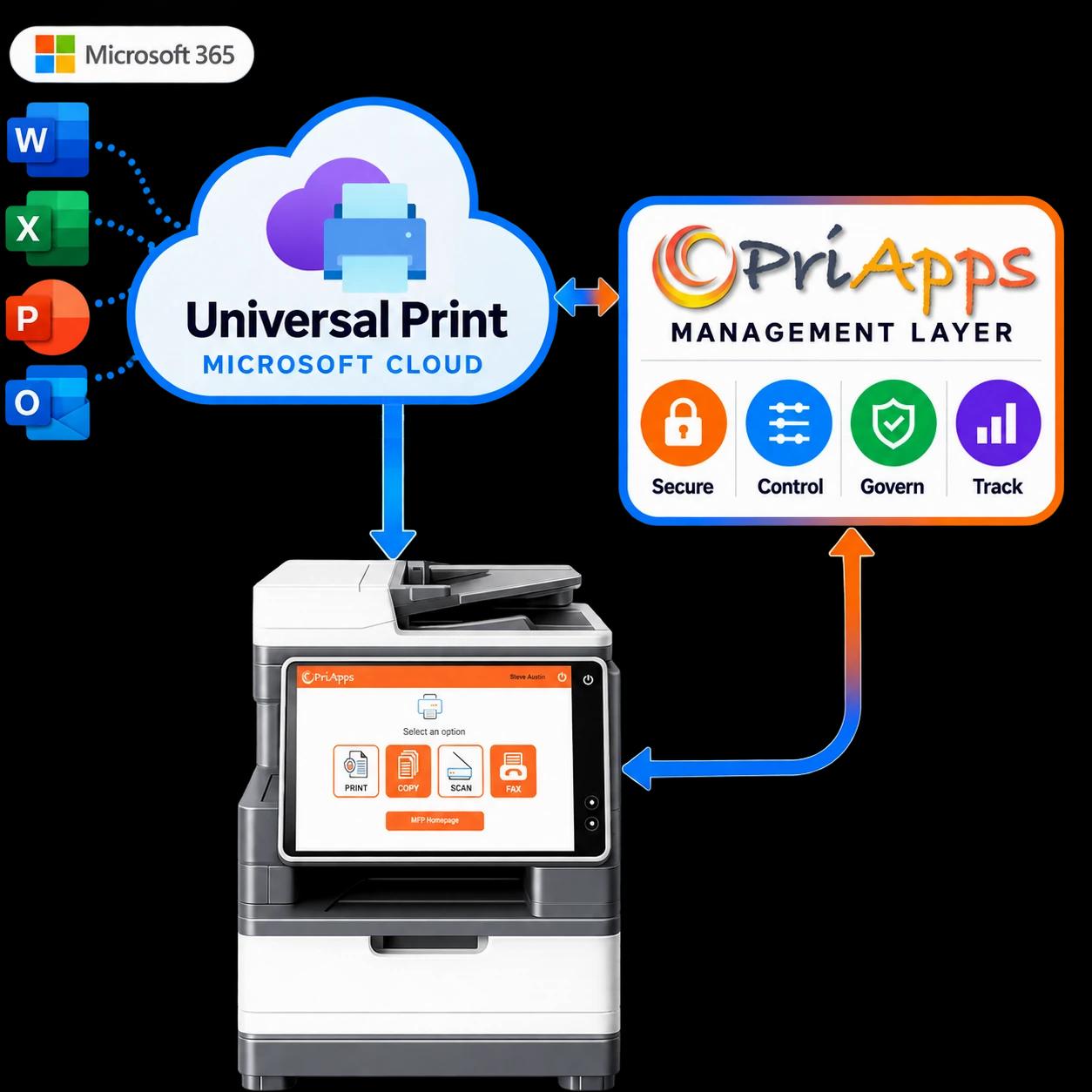
Universal Print gives Microsoft 365 organizations a modern, cloud-based way to print without traditional print servers.
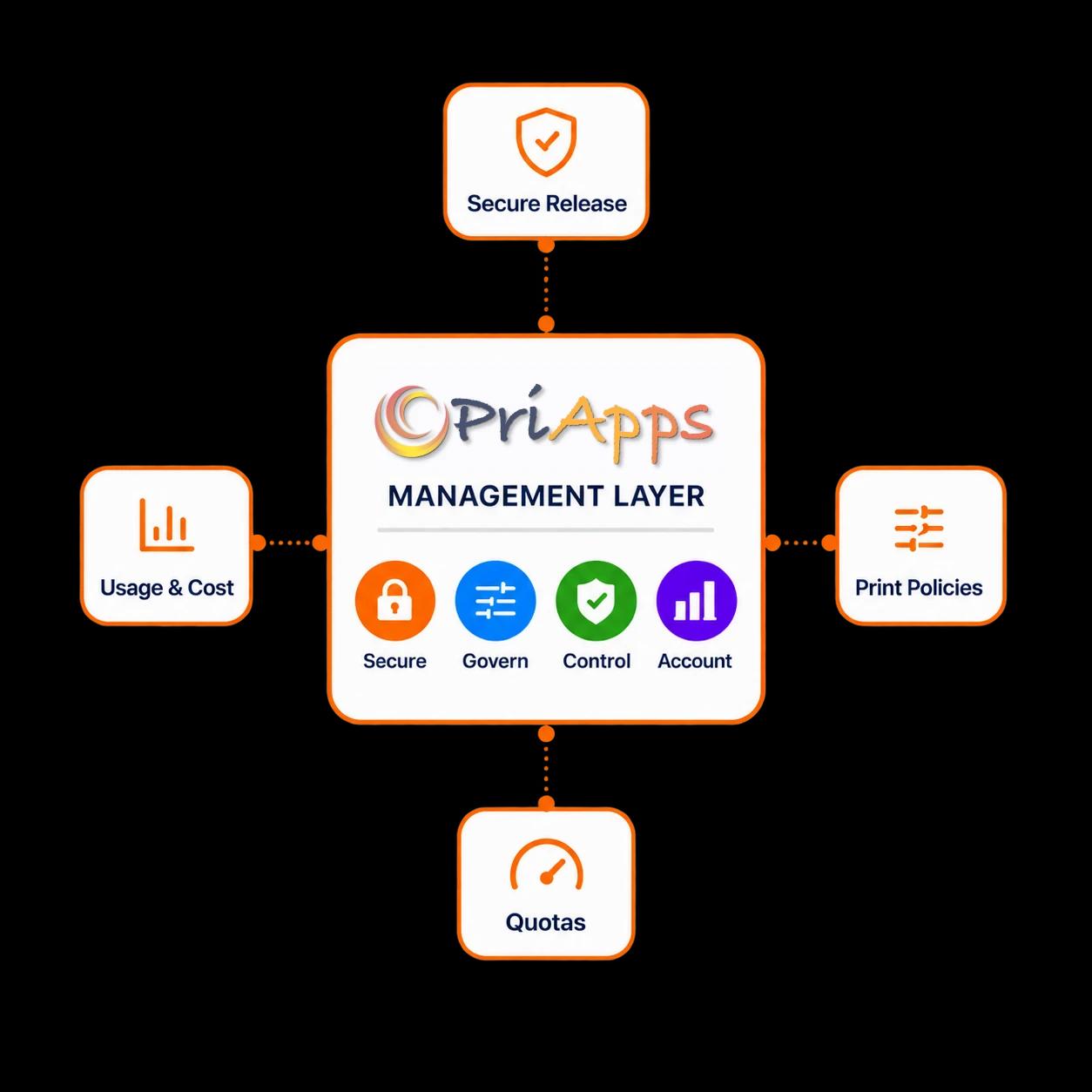
PriApps adds the enterprise management layer around it — secure print release, enforceable print policies, quotas, and comprehensive usage and cost tracking across your print environment.
And PriApps works with Universal Print rather than replacing it. Print jobs remain inside Universal Print until the user is ready to release them — at any make or model of printer or MFP.
A MODERN FOUNDATION FOR CLOUD PRINTING
Universal Print solves the print infrastructure problem
Microsoft Universal Print moves print infrastructure into the Microsoft cloud and can eliminate the traditional print servers, queues, and driver estates organizations have maintained for decades.
PriApps builds on that foundation.
Cloud-based printing
Manage printing through Microsoft 365 rather than conventional print-server infrastructure.
Microsoft Entra ID
Users and printers operate within the Microsoft identity environment organizations already use.
Driverless by design
Universal Print uses modern print standards rather than maintaining individual printer drivers on every endpoint.
Support for existing fleets
Universal Print-ready devices connect directly, while other printers can be connected through the Universal Print connector.
PriApps leaves those advantages intact — and adds the print-management capabilities enterprises need around them.
THE MANAGEMENT LAYER UNIVERSAL PRINT DOESN'T PROVIDE
Cloud printing and print management are not the same thing
Universal Print provides the infrastructure for getting a print job from the user to the printer.
PriApps gives organizations greater control over what happens before, when, and after that job is printed.
Enterprise Secure Print Release
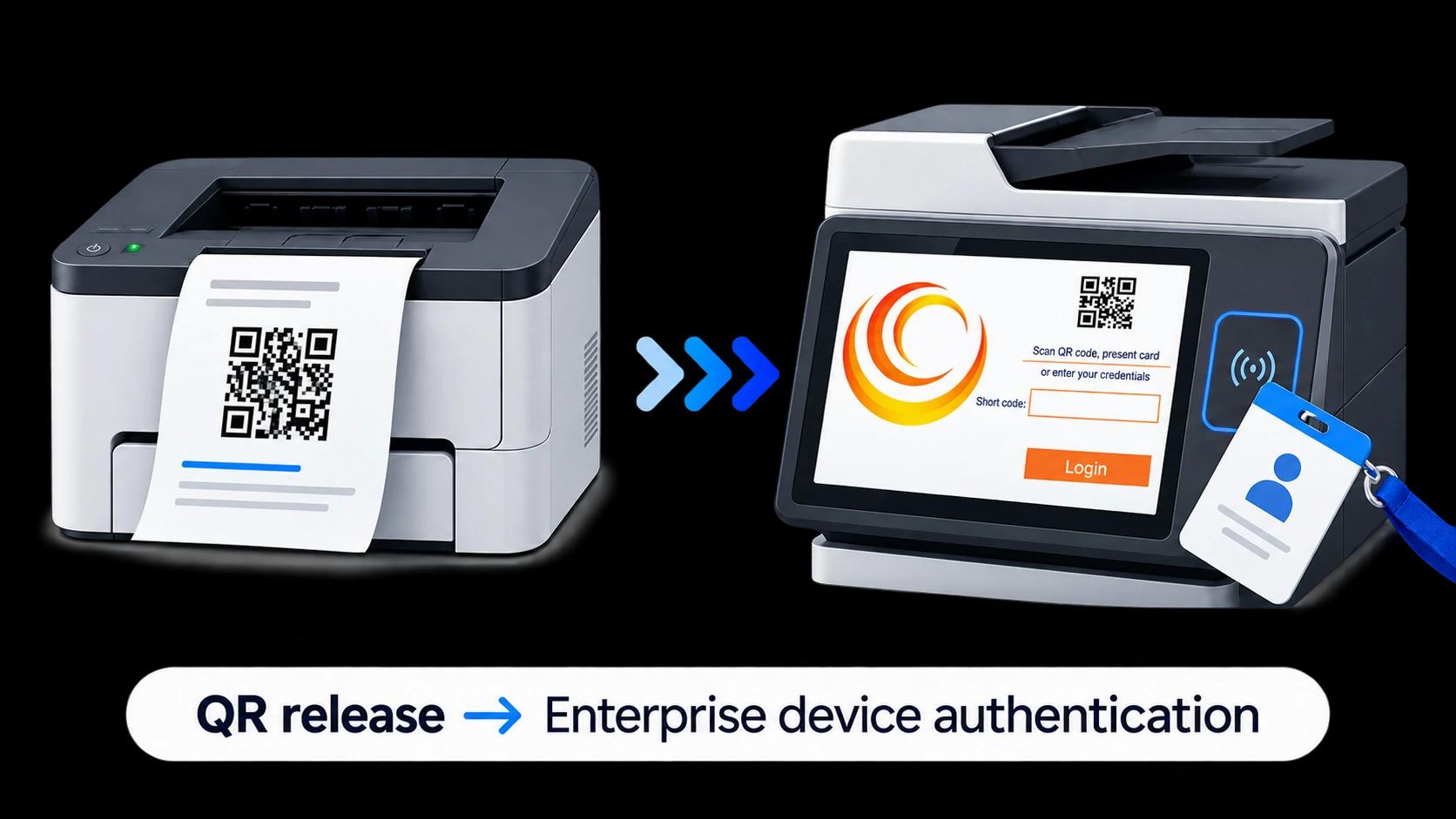
Universal Print includes QR-code secure release. PriApps adds embedded secure release at the device, with authentication options designed for enterprise environments.
Enforceable Print Policies
Universal Print administrators can configure printer defaults such as duplex and color settings, but users can override those defaults. PriApps adds rules that can enforce how printing takes place — helping organizations control color, duplex printing, routing, and other print behavior according to policy.
Quotas & Allowances
Set print budgets, allowances, and limits by user, group, or department — and enforce them as printing takes place.
Complete Usage & Cost Visibility
Universal Print reports on the printing it processes. PriApps extends visibility across the broader print environment and adds copy tracking at supported MFPs — giving organizations a much more complete picture of device usage and cost.
ENTERPRISE SECURE PRINT RELEASE
A paper QR code isn't an enterprise secure print strategy
Universal Print provides a built-in way to hold print jobs until a user is physically present at the printer. It works — but its standard method relies on a QR code attached to the device and a separate phone or browser interaction.
PriApps takes secure release onto the MFP itself.
Universal Print secure release
- A QR code is generated for each printer and attached to the device
- The user scans the code with a phone
- The Universal Print portal opens in the browser
- The user signs in, selects the pending job, and releases it
- Additional device-based authentication options depend on printer and manufacturer support
PriApps Secure Print Release
- PriApps runs as an embedded application on supported MFP control panels
- Users authenticate directly at the device
- Release with a card, badge, PIN, or the PriApps Touch-Free smartphone app
- Release at any make or model of printer or MFP — including jobs held in Universal Print
- Users can release their jobs at the device that suits them, rather than being tied to the printer originally selected
Explore: Secure Print Release →
A DIFFERENT KIND OF UNIVERSAL PRINT INTEGRATION
Keep the print job inside Universal Print
PriApps doesn’t replace Microsoft’s print infrastructure with another print system.
Using Microsoft Graph, PriApps works with Universal Print’s pull-print capabilities to hold the job until the user is ready to print and direct it to the appropriate device when released.
PriApps does not require a separate print-job repository.
That means the print job can remain within the Universal Print environment while PriApps adds the intelligence needed to securely release, govern, and account for it.
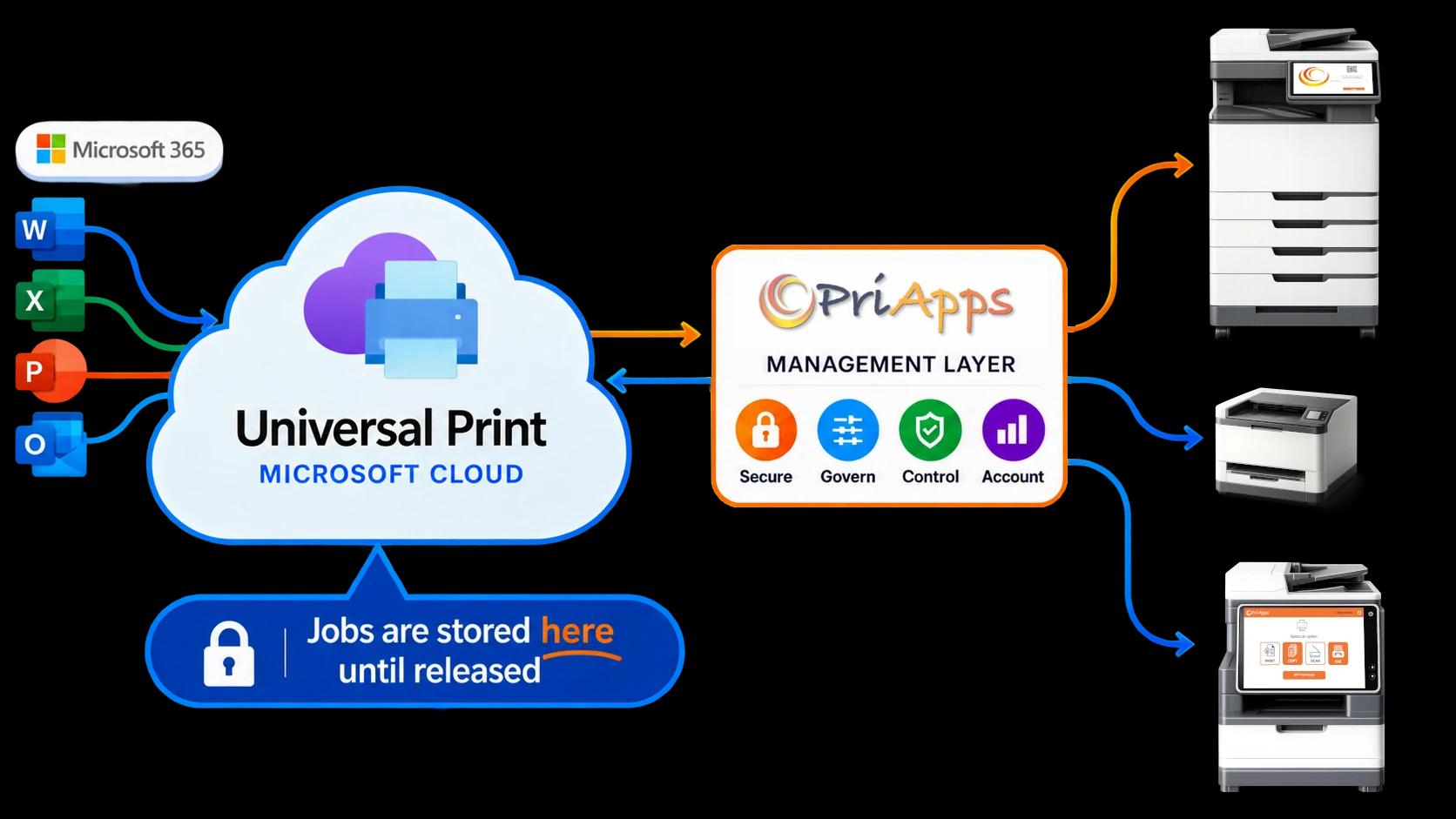
Jobs remain in Universal Print
No separate print-job repository is required simply to provide PriApps secure release.
Release where the user needs it
Users can authenticate and release their jobs at any make or model of printer or MFP across the fleet.
Add management without replacing the platform
Universal Print remains the Microsoft cloud printing platform. PriApps adds the enterprise management capabilities around it.
Universal Print provides the print path. PriApps provides the control.
HOW IT WORKS
From Microsoft 365 to secure release at the device
Print as normal
Users print from their applications and devices through the Universal Print environment.
The job remains in Universal Print
PriApps uses Microsoft Graph to control the print workflow while the job remains within Universal Print.
Walk to a device
The user goes to any make or model of printer or MFP across the fleet.
Authenticate
The user identifies themselves with a card, badge, PIN, or the PriApps Touch-Free smartphone app.
Release, govern, and track
PriApps releases the job, applies the organization's print policies, records the activity, and applies any relevant quota or allowance.
CONTROL MORE THAN THE PRINT QUEUE
Turn cloud printing into managed printing
PriApps provides the controls organizations need to manage printing consistently across users, departments, locations, and devices.
Secure Print Release
Protect confidential documents and reduce abandoned printing by releasing jobs only after the user authenticates.
Rules-based Printing
Apply organizational print policies automatically — including controls for color, duplex printing, and job routing.
Quota Management
Set and enforce budgets, limits, and allowances by user, group, or department.
Usage Tracking & Analytics
Understand who's printing, what they're printing, where it's being printed, and what it's costing.
USAGE & COST VISIBILITY
Universal Print can only report on the printing it handles
Universal Print gives you reporting for the jobs that pass through it. That's rarely the whole picture — and it never includes the cost of copying.
Copying is a metered cost on every device — and Universal Print was never designed to see it.
PriApps brings all of it into one record: every print, wherever it originates, and copy activity at supported MFPs — attributed by user, device, and department, and costed for budgeting, chargeback, and recovery.
100+
data points captured for every print job.
Explore: Usage Tracking & Reporting →
Universal Print makes cloud printing simpler. PriApps makes it manageable.
Keep the Microsoft print infrastructure. Add the enterprise controls around it.
PRIAPPS FOR MICROSOFT 365
Extend the Microsoft environment you already have
PriApps for Microsoft 365 is the primary PriApps product for organizations extending Universal Print with enterprise print-management capabilities.
It brings secure print release, print policies, quotas, and expanded usage and cost tracking into Microsoft 365 and Universal Print environments.
PriApps for Microsoft 365
- Enterprise Secure Print Release
- Rules-based Printing
- Quota Management
- Usage Tracking & Reporting
- Microsoft Graph integration with Universal Print
- Support for mixed printer and MFP environments
Deployment: on-premises, hybrid, and cloud-native.
Depending on the environment and requirements, additional PriApps products can extend the solution:
- PriApps CloudPrint provides a cloud-native PriApps print-management environment.
- PriApps SSO adds identity and authentication capabilities at supported MFP control panels.
- For legal and professional-services organizations, PriApps for Legal adds specialized cost-recovery and client/matter accounting capabilities.
Explore: PriApps for Microsoft 365 →
Frequently asked questions
Does PriApps replace Microsoft Universal Print?
No. PriApps extends Universal Print. Universal Print remains the cloud print infrastructure. PriApps adds enterprise secure release, print policies, quotas, usage tracking, and other management capabilities around it.
Do we still need print servers?
Universal Print can eliminate traditional print-server infrastructure. Universal Print-ready printers can connect directly to Microsoft's service. Existing printers that don't support Universal Print directly can be connected through Microsoft's Universal Print connector. PriApps works within this environment rather than requiring customers to replace Universal Print with another print platform.
Does PriApps move our print jobs into another print system?
No separate print-job repository is required. PriApps uses Microsoft Graph and Universal Print's pull-print capabilities to manage the workflow while the print job remains within the Universal Print environment until it is released.
How does PriApps secure release differ from Universal Print's QR release?
Universal Print's standard QR method requires a QR code attached to the printer. Users scan it with a phone, sign into the browser-based Universal Print portal, and release their pending jobs. PriApps provides an embedded secure-release application at supported MFPs, allowing users to authenticate using options including cards, badges, PINs, and the PriApps Touch-Free smartphone app.
Can users release jobs at different printers?
Yes. PriApps pull printing enables users to authenticate and release their jobs at any make or model of printer or MFP rather than being tied to a single device.
Does Universal Print already support duplex and color controls?
Universal Print allows administrators to set default printer settings including duplex and color mode. PriApps goes further by applying enforceable print policies so organizations can control printing according to user, group, department, document, or other business rules.
Can PriApps set user and department print quotas?
Yes. PriApps can apply budgets, quotas, allowances, and limits to users, groups, and departments and enforce them as printing takes place.
Can PriApps track printing outside Universal Print?
Yes. PriApps can track supported print activity across the wider environment, not only the jobs processed through Universal Print. It can also extend usage and cost tracking to copying and other supported metered MFP activity.
Does PriApps support ChromeOS?
PriApps can provide managed, secure, and tracked printing for ChromeOS users as part of a broader PriApps environment, alongside Windows and macOS. This is particularly useful for organizations that need a consistent print-management experience across different endpoint platforms.
Keep Universal Print.
Add enterprise print management.
Universal Print gives Microsoft 365 organizations a modern cloud printing platform.
PriApps adds the controls enterprises need around it — secure release, enforceable print policies, quotas, and comprehensive usage and cost tracking — while allowing Universal Print to remain the underlying Microsoft print infrastructure.
One cloud print platform.
One enterprise management layer.
One consistent way to control printing across the organization.
Over 20,000 organizations worldwide rely on PriApps technology to manage print, copy, and document workflows across mixed device fleets.